
Solid-state storage gets most of the attention, but hard disk drives still hold the bulk of the world’s enterprise data. Backups, file shares, surveillance archives, and object storage all depend on HDDs, because no other medium matches their cost per terabyte at scale.
The catch is that an enterprise HDD is a different product from the drive in a desktop PC. Choosing the wrong one leads to slow rebuilds, premature failures, and arrays that misbehave under load. This guide covers what to look for before you buy.
Enterprise HDD vs. Desktop HDD: Why the Difference Matters
A desktop drive assumes a few hours of use per day. A server drive assumes it will spin continuously for years, often alongside dozens of other drives in the same chassis. Enterprise models are built for that environment:
- Vibration tolerance: Rotational vibration sensors and firmware compensation keep performance stable in dense enclosures.
- Error recovery control: Enterprise firmware gives up on a bad sector quickly so the RAID controller can recover the data, instead of stalling the whole array while the drive retries.
- Higher workload ratings: Enterprise drives are rated for far more data transferred per year than consumer models.
- Lower unrecoverable error rates: This matters most during a RAID rebuild, when every remaining drive is read end to end.
A desktop drive in a RAID array may work at first. Under stress, though, it is far more likely to be dropped from the array unnecessarily.
SAS vs. Nearline SATA: Choosing the Interface
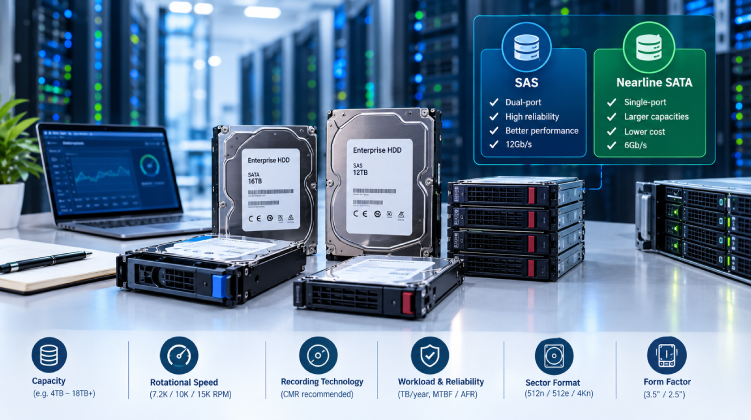
The two main interfaces for server HDDs serve different needs.
SAS (Serial Attached SCSI)
- Dual-port design allows redundant paths to the drive, which supports high-availability setups.
- Stronger error handling and better performance under mixed, concurrent workloads.
- Typically 12Gb/s on current hardware.
- Higher price per terabyte.
SAS suits storage arrays, virtualization hosts, and any system where uptime and consistent latency matter more than cost.
Nearline SATA
- Single-port interface, usually at 6Gb/s.
- Lower cost per terabyte, with the largest capacities available.
- Well suited to sequential workloads such as backups, archives, and media storage.
Check that your backplane and controller support the interface you choose. A SAS-capable backplane accepts both SAS and SATA drives, but a SATA-only backplane will not accept SAS.
Key Specifications to Compare
Capacity
Enterprise drives now reach well into the double-digit terabyte range. Bigger is not always better, though. Larger drives take longer to rebuild after a failure, which extends the window of reduced redundancy. For large arrays, pair high-capacity drives with RAID 6 or an equivalent double-parity scheme.
Rotational Speed
- 7.2K RPM: The standard for high-capacity, cost-efficient storage.
- 10K and 15K RPM: Lower capacities, better random I/O. These are increasingly replaced by SSDs for performance-sensitive workloads.
Recording Technology: CMR vs. SMR
Conventional magnetic recording (CMR) writes each track independently. Shingled magnetic recording (SMR) overlaps tracks to gain capacity, which can slow random writes and prolong RAID rebuilds. For general server and RAID use, CMR is the safer choice. Always confirm the recording technology on the datasheet before purchasing.
Workload Rating and Reliability
Look for the annual workload rating, measured in terabytes per year, and the mean time between failures (MTBF) or annualized failure rate (AFR). These figures are manufacturer estimates, so treat them as a way to compare models, not as a guarantee. A drive rated for a higher workload gives you more headroom if usage grows.
Sector Format
Drives ship in 512n, 512e, or 4Kn sector formats. Most modern servers support 512e, but some older controllers and operating systems do not handle 4Kn. Confirm compatibility with your RAID controller and OS.
Form Factor
- 3.5-inch: Highest capacities, common in storage-heavy servers.
- 2.5-inch: Better density per rack unit, typically used for 10K SAS drives and smaller-capacity nearline models.
Matching HDDs to Real Workloads
| Workload | Recommended Drive Type |
| Backup and archive | High-capacity nearline SATA, CMR |
| File servers | Nearline SAS or SATA, 7.2K RPM |
| Surveillance storage | Drives rated for continuous write workloads |
| Virtualization (cost-sensitive) | 10K SAS, or SSD for hot data |
| Object and scale-out storage | High-capacity CMR drives, rated for 24×7 use |
Common Mistakes When Buying Server HDDs
Most storage problems trace back to a handful of avoidable errors:
- Mixing drive models in one array. Different firmware, speeds, and cache behavior can cause uneven performance.
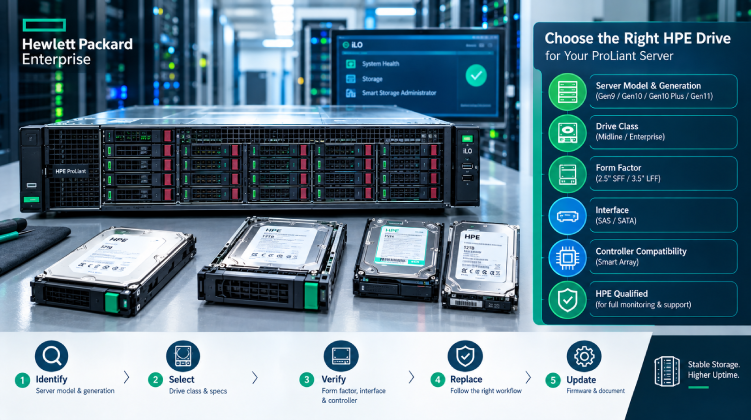
- Ignoring vendor compatibility. Dell and HPE servers often expect branded or validated drives, and unlisted models may trigger warnings or lose health monitoring.
- Buying by price per terabyte alone. A cheaper drive with a lower workload rating can cost more in replacements.
- Skipping firmware checks. Outdated drive or controller firmware is a frequent source of unexplained drops from an array.
- Using SMR drives in RAID without confirming the controller and workload can handle them.
Best Practices for Long-Term Drive Health
Buying the right drive is only half the job. These habits extend drive life and reduce surprises:
- Monitor SMART data and controller logs for reallocated sectors, pending sectors, and rising error counts.
- Keep temperatures stable. Sustained heat shortens drive life, so maintain airflow and use blanking panels in empty bays.
- Keep hot spares in the array so rebuilds start automatically.
- Stagger replacements. Drives bought and installed together tend to age together, so avoid replacing a whole array in one go without a plan.
- Back up regardless of RAID. RAID protects against drive failure, not deletion, corruption, or ransomware.
Where to Source Enterprise Drives in Bangladesh
For IT teams in Bangladesh, sourcing is as important as specification. Import delays can turn a single failed drive into a long period of degraded redundancy, and unverified sellers raise the risk of refurbished or mislabeled stock. Working with a local supplier that stocks validated parts shortens repair windows and gives you someone accountable if a drive fails early.
Datacom supplies enterprise server HDDs for major server platforms, including SAS and nearline SATA options in a range of capacities. If you are planning a storage expansion or replacing aging drives, a reliable enterprise storage supplier can help you confirm compatibility with your exact server model before you order.
Final Thoughts
A good server HDD purchase starts with the workload, not the price tag. Decide whether you need capacity, performance, or high availability. Then pick the interface, recording technology, and workload rating that fit, and confirm compatibility with your server and controller. Pair that with solid monitoring and a spare-drive plan, and your storage will stay predictable for years.